Feature
AI Email Chat Assistant
Just describe what you need — rewrite email copy, change tone, translate text, or redesign entire email sections. Our AI assistant understands your intent and delivers production-ready results, right inside the email builder.Casual
Formal
Shorter
Longer
Simplify
Emoji
Translate
Summarize
+ anything you ask
Rewrite copy in any tone
Translate emails instantly
Generate MJML sections from a prompt
Conversational editing workflow
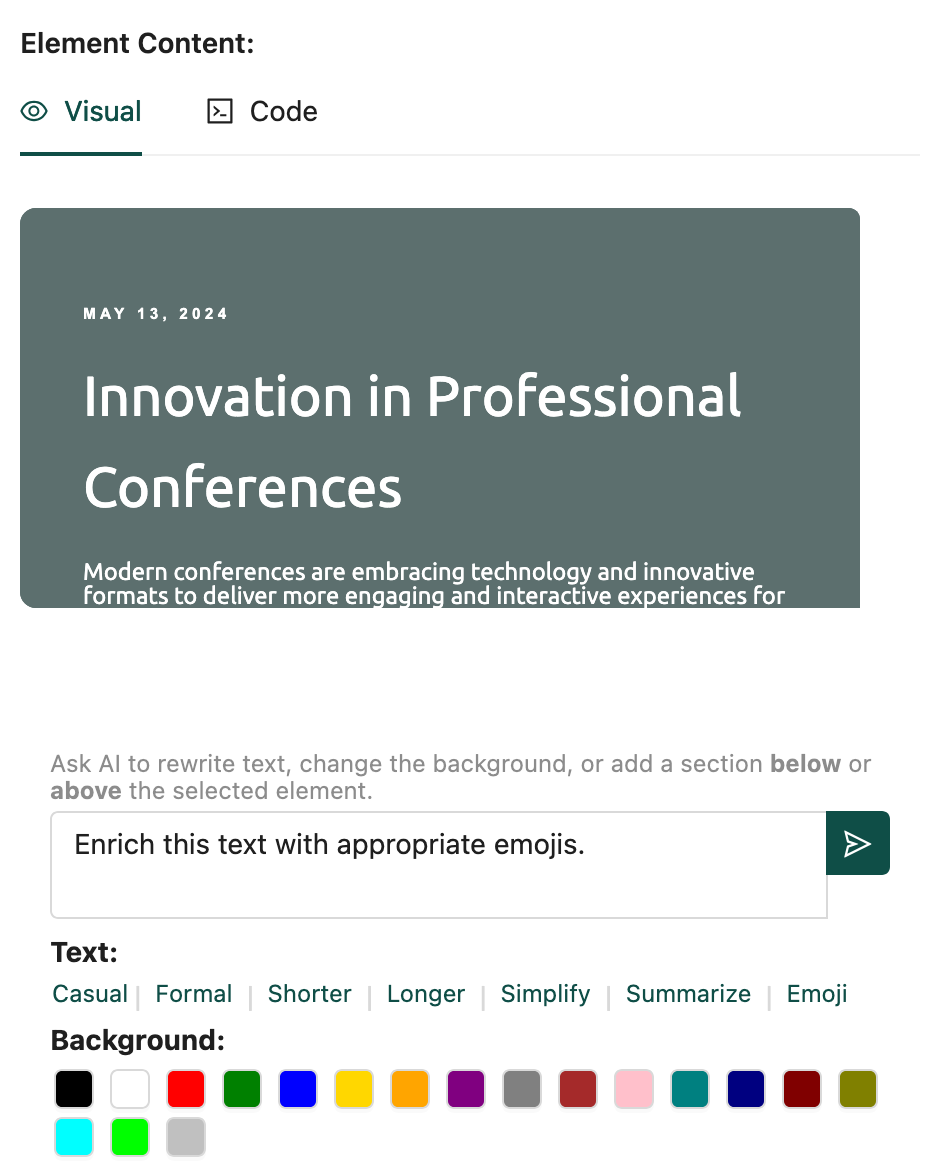
What the AI assistant can do for your emails
Rewrite & refine email copy
Select any text block in your email and let AI rewrite it. Make it shorter, longer, more formal, or add a casual tone — in one click.
Translate email content instantly
Reach global audiences by translating your entire email or individual sections into any language, while preserving your template layout.
Generate email sections from scratch
Describe what you need — a hero banner, a product grid, or a CTA block — and AI generates production-ready MJML code for your email.
Conversational email editing
Chat naturally with the AI to iterate on your email design. Ask follow-up questions, request tweaks, and refine until the email is perfect.
How it works
1
Open the AI panel
Click the AI icon in the email builder toolbar to open the chat assistant alongside your email.2
Describe your request
Type what you need — "make this email section more formal" or "add a product showcase block with 3 columns".3